
Edu Intelligence can analyse information from multiple data sources at the same time. The more data sources included, the more comprehensive the response can be.
Understanding Survey Data
Survey Data is unique because it often contains large volumes of written feedback from students, staff, families, and other stakeholders. Unlike structured datasets, which can be analysed quickly, survey responses require the AI to:
- Read and interpret written comments
- Identify themes and sentiment
- Group similar responses together
- Connect findings to other available data sources
This additional analysis provides richer insights but can increase processing time.
When will I experience longer wait times?
Queries that include Survey Data may take up to four minutes to complete, particularly when:
- Large surveys have been conducted
- Multiple survey cycles are being analysed
- The AI is comparing survey responses with other data sources
During this time, the AI is actively analysing and connecting information to produce a more comprehensive answer.
How can I receive faster responses?
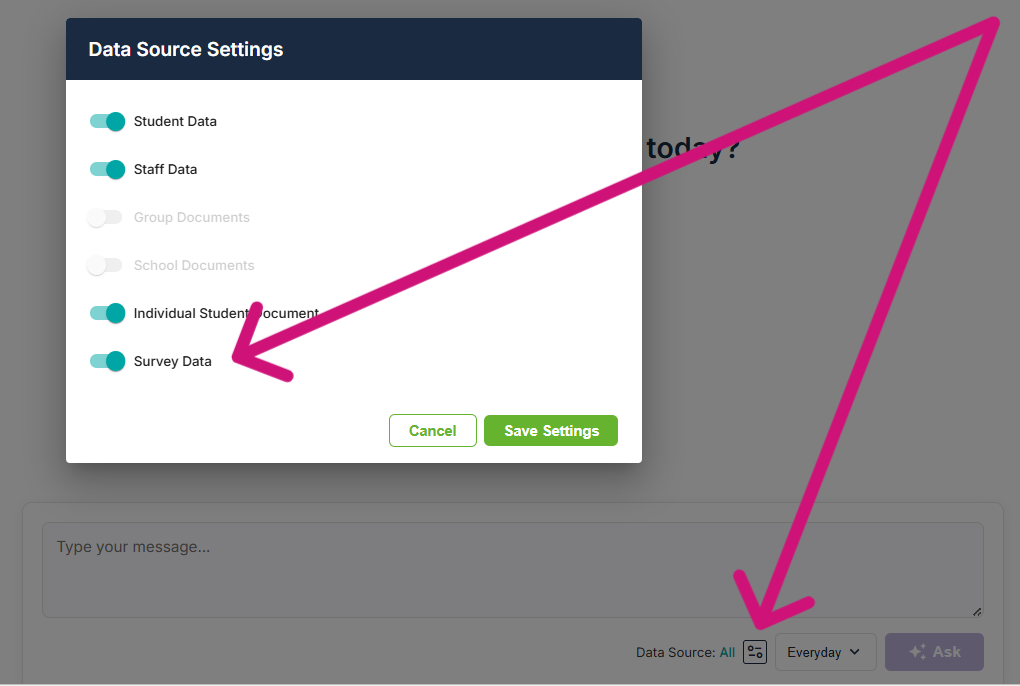
If your question does not require survey feedback, you can disable Survey Data within the Data Source Settings panel.
To do this:
- Open Data Source Settings.
- Locate the Survey Data toggle.
- Switch Survey Data off.
- Submit your question again.
The AI will then answer using only the remaining selected data sources, which can significantly reduce response times.
When should I keep Survey Data enabled?
We recommend keeping Survey Data enabled when your question relates to:
- Stakeholder perceptions
- Experiences and opinions
- Themes emerging from feedback
- Wellbeing, culture, engagement, or satisfaction
- Understanding the reasons behind trends in other datasets
Survey Data often provides the context behind the numbers, helping you understand not only what is happening, but why it may be happening.